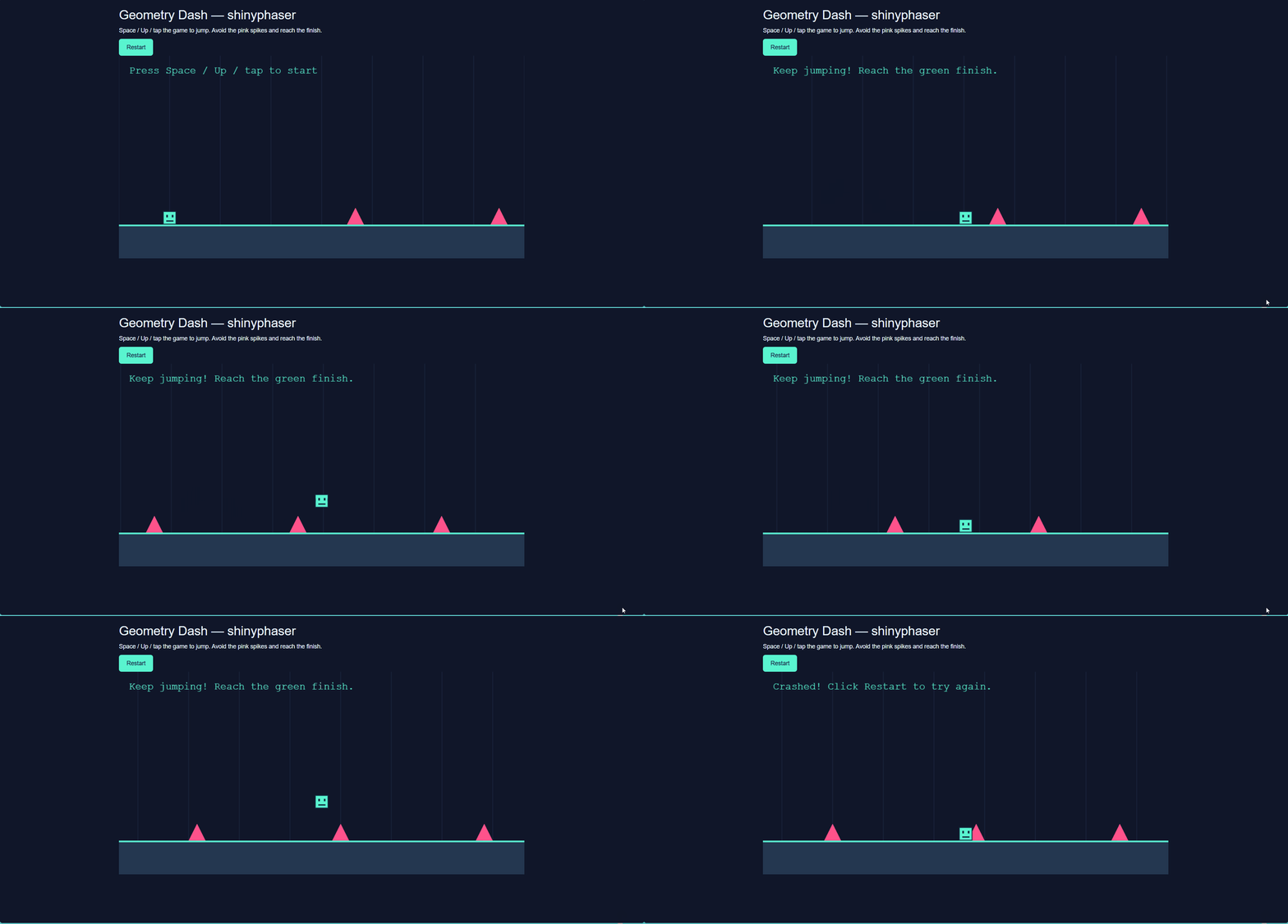
A Geometry Dash-style game needs just a few rules: a cube moves forward, the player jumps over obstacles, and touching an obstacle ends the run. This walkthrough builds a small version with shinyphaser. Jumping and collision reactions run in the browser, without waiting for an R round trip.
Use the current development version of shinyphaser. The complete
example, including its artwork, lives in
inst/examples/geometry_dash. From the repository root,
launch it with:
shiny::runApp("inst/examples/geometry_dash")Create the scene
The following is a complete, smaller app. It reuses the cube and
spike images bundled with the installed package. Save the code as
app.R in a Shiny app directory. The explicit resource path
makes the images available over HTTP.
gravity_y pulls the cube down. A visible floor supplies
the artwork, while an invisible collision rectangle supplies the static
physics body. The sprite is 32 by 32 pixels, matching the cube
image.
library(shiny)
library(shinyphaser)

addResourcePath("dash-assets", system.file(
  "examples", "geometry_dash", "www", package = "shinyphaser"
))

game <- PhaserGame$new(width = 960, height = 480, gravity_y = 1400)
ui <- tagList(
  tags$p("Space to start and jump. Avoid the spikes and reach the green line."),
  tags$button(type = "button", onclick = "window.location.reload()", "Restart"),
  game$use_phaser()
)

server <- function(input, output, session) {
  game <- PhaserGame$new(width = 960, height = 480, gravity_y = 1400)
  game$set_shiny_session(session)
  game$set_world_bounds(1800, 480)

  alive <- game$add_state("alive", TRUE)
  grounded <- game$add_state("grounded", FALSE)

  game$add_rectangle("floor_art", 900, 440, 1800, 80, "0x243750")
  game$add_collision_rectangle("floor", 900, 440, 1800, 80)
  player <- game$add_sprite("cube", "dash-assets/cube.png", 120, 384,
                             frame_width = 32, frame_height = 32)
  player$follow_camera()

  status <- game$add_text("Press Space to start", "status", 24, 24)
  status$set_scroll_factor(0)
  status$set_depth(20)

  game$add_collider("cube", "floor", browser_action = browser_actions({
    grounded$set(TRUE)
  }))

  game$add_control("Space", browser_action = browser_actions({
    if (alive$is_true() && grounded$is_true()) {
      grounded$set(FALSE)
      player$set_velocity_x(260)
      player$set_velocity_y(-480)
      status$set("Keep jumping!")
    }
  }))

  for (x in c(560, 900, 1240)) {
    name <- paste0("spike_", x)
    game$add_image(paste0(name, "_art"), "dash-assets/spike.png", x, 380)
    game$add_collision_rectangle(name, x, 385, 20, 30)
    game$add_overlap("cube", name, browser_action = browser_actions({
      if (alive$is_true()) {
        alive$set(FALSE)
        player$stop_motion()
        status$set("Crashed! Click Restart.")
      }
    }))
  }

  game$add_rectangle("finish_art", 1600, 300, 8, 200, "0x59f5d0")
  game$add_collision_rectangle("finish", 1600, 300, 8, 200)
  game$add_overlap("cube", "finish", browser_action = browser_actions({
    if (alive$is_true()) {
      alive$set(FALSE)
      player$stop_motion()
      status$set("Level complete! Click Restart.")
    }
  }))
}

shinyApp(ui, server)
Jump only after landing
The floor collider sets browser state grounded to
TRUE whenever the cube lands. Space checks both
alive and grounded, clears the grounded flag,
and sets the cube’s velocity. Positive horizontal velocity starts the
automatic run; negative vertical velocity launches the jump. Gravity
brings the cube back to the floor. Clearing the flag prevents another
jump while airborne.
Calls such as grounded$is_true() and
grounded$set() are browser-action expressions: use them
inside browser_actions(), rather than executing them as
ordinary R methods. See Choose
between browser and server actions for more details.
Stop on obstacles and finish the level
Each spike has separate artwork and an inset rectangular hitbox. An
overlap with the hitbox sets alive to FALSE,
stops movement, and updates the text. The finish line uses the same
pattern with a success message. The alive flag also prevents further
jumps after either outcome.
follow_camera() keeps the player in view as the course
scrolls. set_scroll_factor(0) fixes the status text to the
screen, and set_depth(20) draws it above the game objects.
Restart reloads the page and creates fresh session state.
Tune the course
- Increase horizontal velocity to make obstacles approach faster.
- Make vertical velocity more negative for a higher jump.
- Increase
gravity_yfor a shorter, sharper jump. - Adjust spike positions, keeping enough space to land between jumps.
The full example adds a longer course, Up-arrow and tap controls, and
styling. Its images stay in the game’s own www/ directory.
Phaser itself is loaded from jsDelivr, so the browser needs Internet
access.